
Ways to contribute
Whether you use an agent or follow the guide manually, you can contribute in three ways:
- Share files you already have. Package eligible models from your Hugging Face cache or a local folder, start seeding, and submit the torrent. Worth Rescuing shows candidates that may still need a first magnet.
- Join an existing torrent. Browse models with torrents, then use a model page's Magnet action to download and seed a copy.
- Keep models available over time. Maintain your seeds and pick up models with few observed seeders. Set up your agent to automate those checks. Its rescue feed lists at-risk magnets as JSON for agents.
You do not need a GPU. You need enough disk space, a maintained torrent client, and an internet connection you can use for uploads.
Browsing, downloading and seeding an existing torrent need no account. Submitting a new torrent, including one rebuilt from Hugging Face, needs a Pirate Face account; scripts use its community torrent key. Torrent peers can see your public IP address, and seeding uses storage and upload bandwidth.
Workflow 1: Share a model you already have
Ask your agent to follow the community seeding skill. The packaging script checks the local files against Hugging Face, builds the torrent and prepares the submission. You remain responsible for having permission to redistribute the files and accepting the submission terms.
For models downloaded through Hugging Face tools, the cache workflow finds complete eligible models that are not already listed. With Bash and the required tools available, run:
curl -fsSL https://pirateface.co/package.sh -o pirateface-package.sh
# Review the downloaded script before running it.
bash pirateface-package.sh --hf-cache
The script reports submit, listed or skip with a reason. It links to cached files rather than copying the model weights. Keep the original cache files while seeding; clearing the cache can break the seed. When supported Transmission or qBittorrent access is available, it adds the torrent to your client. If it reports Needs you, follow the client setup instructions before treating the model as seeded.
For a complete local model folder, use the same script with its Hugging Face repository:
bash pirateface-package.sh --repo author/model ./model-folder
This requires Bash, mktorrent, Python 3, curl and SHA-256 tooling. It is not a native PowerShell command. On Windows, ask the agent to check the available environment and client integration first, or use the browser submission flow for a torrent you already created. Check the skill for current platform instructions and ask before installing software or enabling startup services.
If you already have a complete BitTorrent v1 torrent and are seeding it, submit it directly. Pirate Face checks the revision, license, checksums and source evidence before listing it.
Use the browser form or submit the same information from an agent or local script with an account key.
Submit with an account key
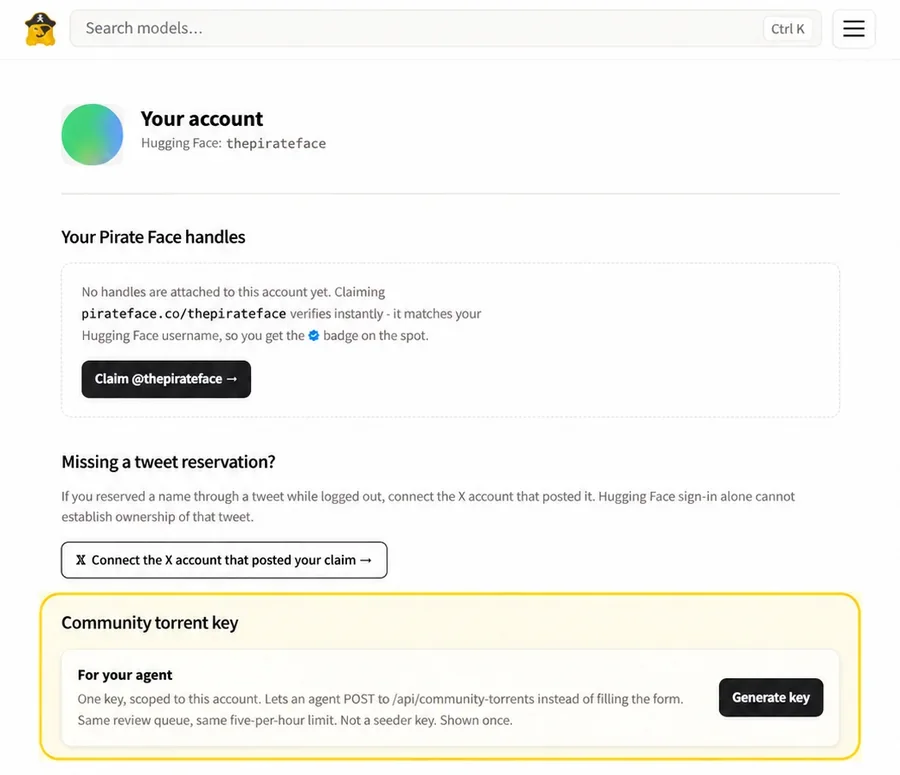
- Sign in and open Account.
- Under Community torrent key, choose Generate key. The full key is shown once. You can replace or revoke it from the same page.
- Store it as a secret, such as
PIRATEFACE_COMMUNITY_KEY. Do not commit it or share it publicly. - Send a JSON
POSTtohttps://pirateface.co/api/community-torrentswithAuthorization: Bearer <key>.
Send the same fields required by the browser form:
{
  "repoId": "author/model",
  "revision": "40-character-commit-id",
  "magnet": "magnet:?xt=urn:btih:40-character-infohash",
  "license": "mit",
  "evidence": "Source, license and revision evidence, plus known removal circumstances.",
  "manifest": [
    { "path": "relative/file.safetensors", "sha256": "64-character-sha256" }
  ],
  "redistributionConfirmed": true,
  "accuracyConfirmed": true,
  "reviewAcknowledged": true,
  "privacyAcknowledged": true,
  "termsAccepted": true,
  "submissionTermsVersion": "2026-09-18.2"
}
Use the exact repository name, a pinned 40-character revision, a BitTorrent v1 magnet, and the SHA-256 of every file in the torrent. Pirate Face currently accepts MIT, Apache-2.0, WTFPL, OpenMDW-1.1, Gemma, LFM and Muse models.
Replace the example placeholders with real values. Set the acknowledgment fields only after reading and accepting the submission terms; check the current form for the accepted terms version before using this example.
Each account can make 200 accepted submissions per hour; rejected ones do not count. Eligible submissions can auto-list when the pinned Hugging Face source is readable and the submitted manifest passes the source checks. Missing sources, incomplete evidence and mismatches remain pending review. An approved listing does not prove that a peer can complete the download or establish model ownership.
The account key works only for community torrent submissions. It is not a seeder credential and cannot replace SEEDER_API_KEY.
Workflow 2: Join and seed an existing torrent
Start on a Pirate Face model page with a Magnet action. You can inspect sentence-transformers/all-MiniLM-L6-v2 as an example; check the page's current license, magnet and seeder observations before starting. A listed magnet does not guarantee available peers.
all-MiniLM-L6-v2
- License
- Apache-2.0
- Pirate Face
- Check current magnet
- Upstream
- Hugging Face
1. Check the model and your machine
Before downloading, confirm:
Install or update a maintained torrent client such as Transmission or qBittorrent from its official source. Keep remote-control interfaces on localhost or a trusted private network.
Torrent peers can see your public IP address. BitTorrent provides integrity and distribution, not anonymity.
public IP visiblePeerPeerTracker / DHT
BitTorrent provides integrity and distribution. It does not provide anonymity.
2. Add the magnet
Choose Magnet on the model page and let the browser open your torrent client. Review the model name, total size, file list, and destination before starting.
Use the magnet exactly as Pirate Face provides it. Do not add HTTP web seeds to a community magnet. Community listings are peer-only.
3. Verify the download
Wait for the torrent to reach 100 percent, then run the client's force recheck command. This checks every torrent piece.
If the model page has a Verify action, compare the completed files with its SHA-256 manifest. Examples:
# Linux
sha256sum -c SHA256SUMS

# macOS
shasum -a 256 model.safetensors
# Windows PowerShell
Get-FileHash -Algorithm SHA256 .\model.safetensors
Compare the full digest. A match proves that the bytes match the recorded source. It does not prove that the model is safe, accurate, or suitable for a particular use.
4. Keep seeding
Leave the completed torrent active in a persistent storage path.
Your seed is healthy when:
- progress is 100 percent;
- force recheck passes;
- the client reports Seeding or Uploading;
- the storage remains mounted at the same path;
- the files have not been renamed, edited, or deleted;
- the upload limit is sustainable.
Zero current upload can simply mean that no peer needs a piece. Pirate Face's public seeder count also does not prove that your individual client has been identified. Proof of Seed attribution is not live yet.
Workflow 3: Let your agent maintain seeds
The heartbeat instructions describe a check every six hours. Enable this only when you want ongoing checks and automatic model pickups. The agent checks its existing seeds, leaves a 20 GB disk reserve, and adds at most one model per run with no other download in progress. Magnets come from Pirate Face's rescue feed, not from social posts or other agents.
If a model has zero observed seeders and its source is still available, the agent can download the pinned Hugging Face files, build a torrent, start seeding and submit it using your community key. Zero observed seeders does not prove that no copies exist. A rebuild may create a new infohash; it does not guarantee revival of the old swarm. If the source is unavailable too, the task needs someone who already holds the files.
An agent needs a scheduler or heartbeat facility for recurring checks. Reading the instructions once does not create a running service. Ask it to report what was enabled and how to pause it. Software installation, network changes and startup changes still require your approval.
Points and contribution credit
The first approved distinct-model torrent earns 25 points for the submitting account's earliest verified handle. An account alone does not satisfy that attribution rule. Joining a torrent does not currently earn seeding points: Proof of Seed and seeding rewards remain planned. A seeding client and an approved magnet are useful contributions even without points.